
A real editor
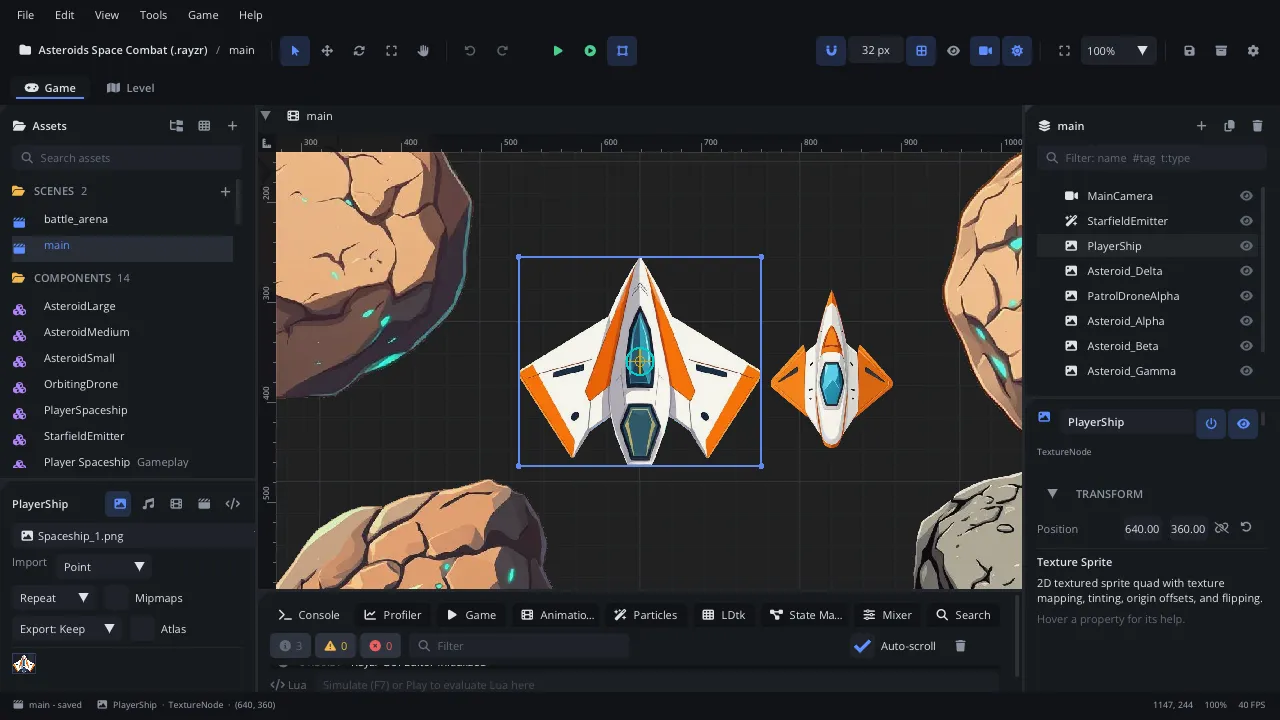
Dockable panels, scene tabs, multi-select, gizmos with snapping, undo for every edit, a command palette and rebindable shortcuts.
Learn more
Rayzr is a 2D game engine with a complete editor: build scenes from nodes, script them in Lua that reloads while the game runs, design levels with a built-in LDtk editor, and export to macOS, Windows, Linux and the web.
macOS · Windows · Linux · Web export · Source on GitHub
Features
Dockable panels, scene tabs, multi-select, gizmos with snapping, undo for every edit, a command palette and rebindable shortcuts.
Learn moreGameplay in Lua 5.4: scripts reload while the game runs, with completion, hover docs, rename and a debugger in the built-in Code tab.
Learn moreEdit .ldtk projects in place: worlds, IntGrid, tiles, LDtk's auto-layer rule engine, entities and fields - byte-exact round trips with LDtk.
Learn moreStandalone games for macOS, Windows, Linux and the web from any editor - no compiler, no SDKs to install.
Learn moreSpine and DragonBones exports on the engine's own runtime: meshes, skins, IK, events and crossfades.
Learn moreBuses with faders, pan, mute / solo and effects - EQ, filters, compressor, delay, reverb - and a DAW-style Mixer tab.
Learn moreScripting
Gameplay is plain Lua 5.4. Save a script and the running game picks it up - no restart. The built-in Code tab knows the whole engine API: completion, hover docs, go to definition, rename across files and a debugger with breakpoints.
-- A coin: the player touching it collects it.local Coin = {}
function Coin:on_body_entered(other)    if self.taken or not other:has_tag("player") then return end    self.taken = true    Scene.find_node("HUD"):get_script():add_coin()    -- A little hop as it goes.    local x, y = self.node:get_position()    Tween.to(self.node, "position", Vec2(x, y - 10), 0.2, "out_quad",        { on_complete = function(n) n:destroy() end })end
return Coin
How it works
One app with everything inside: the editor, the game runners for every platform and the Lua tools.
Start from a complete small game - platformer, RPG, shoot 'em up or puzzle - or an empty project.
Press F5. Tweak a property, paint a level, edit a script: changes show up as you make them.
Build a standalone game for macOS, Windows, Linux or the browser - no compiler needed.
Download the editor, pick a template and press Play.